

9 minutes to read
TL;DR
- Don’t panic — your real site probably isn’t hacked.
- Report the fake site to its host, Action Fraud, and Google.
- Warn customers with a calm notice on your site and social media.
- Ask your hosting company for a quick security audit.
- Review logins, enable Cloudflare, and check your domain’s DNS setup.
- Keep screenshots as evidence and request cached pages be removed.
- Add a short anti-fraud note to your footer for reassurance.
What to Do If Someone Clones Your Website or Pretends to Be Your Business
If you’ve spotted a fake website using your logo, photos, or even your name, you’re not alone. Website cloning and business impersonation are becoming more common especially in sectors like insurance, retail, and professional services.
The goal is almost always the same: to trick customers into sending money or sharing personal details by pretending to be you.
One of our clients recently faced this. A fraudulent Wix site had copied their branding, photo, and text to request “compensation” payments. Fortunately, their genuine website wasn’t hacked it had simply been scraped and duplicated.
Here’s what to do if it happens to you, and how to protect your business going forward.
Step 1: Confirm What’s Really Happened
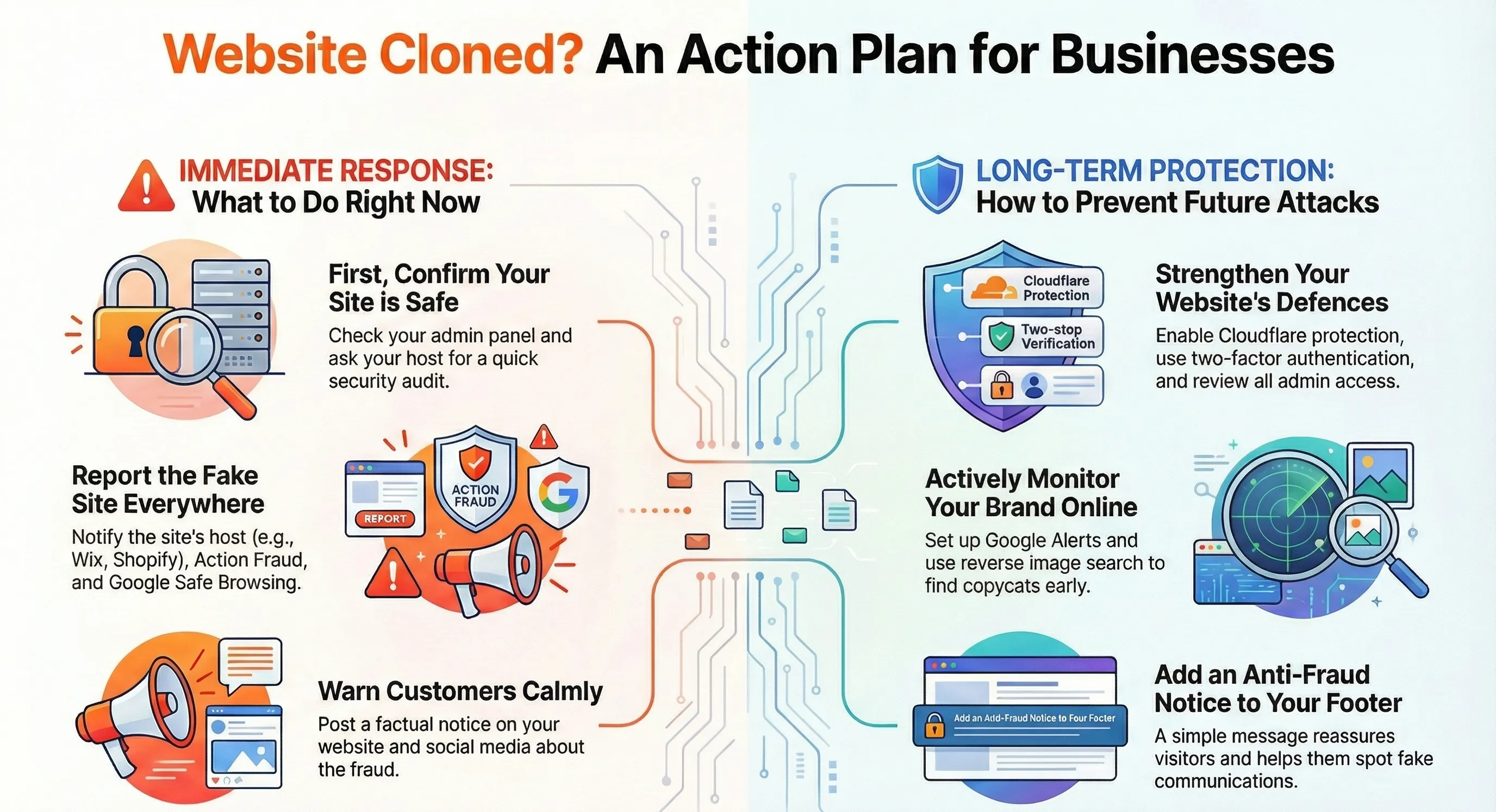
First, don’t panic. In most cases, your real website is fine.
A cloned site usually just copies public-facing content (text, layout, and images) without accessing your systems.
To be sure:
- Log into your website admin area.
- Check that you can access everything as normal.
- Look for any recent changes you didn’t make.
If everything looks normal, your website hasn’t been hacked.
However, we recommend contacting your hosting company for a quick security audit. They can review server logs to see who’s accessed your site, when, and from where — helping identify any suspicious activity. This gives you peace of mind and ensures no rogue accounts or logins have slipped through unnoticed.
Step 2: Report the Fake Website
Act quickly, the sooner you report it, the faster it’s taken down. Report abuse to the hosting platform.
Here are direct links for some of the most common ones:
Also report it to:
- Action Fraud (UK) ↗ – they’ll issue a crime reference number.
- Google Safe Browsing ↗ – helps flag the fake site in search results and browsers.
Step 3: Warn and Reassure Your Customers
Be open and factual — a short, calm message goes a long way.
Post an update on your website and social channels explaining that:
- A fraudulent site has been discovered.
- You never request payments via personal accounts or free email services.
- All genuine communication comes from your official domain (e.g. @yourbusiness.co.uk).
If you send newsletters, include a brief reassurance there too.
Here’s an example you can copy and paste (or adapt for your tone of voice):
We’ve been made aware of a fraudulent website pretending to be [Your Business Name]. This fake site is not connected to us in any way and may be using our name, logo or images without permission.
Please be cautious:
Our official website address is [www.yourbusiness.co.uk] All genuine emails come from @yourbusiness.co.uk addresses We never ask customers to send payments or personal information to personal bank accounts or Gmail/Yahoo addresses If you’re unsure whether a message or website is genuine, please contact us directly on [your phone number] or [your official email address] before taking any action.
Thank you for your understanding and for helping us keep everyone safe online.
Step 4: Strengthen Your Website Security
Even though cloned sites aren’t hacks, it’s a good time to review your setup.
a. Enable Cloudflare protection
Cloudflare helps protect your site by filtering bad traffic, blocking bots, and limiting scraping.
b. Check your domain’s email and DNS configuration
You can instantly check your setup using our free Kontrolit Domain Inspector it’ll show if your SPF, DKIM, and DMARC records are in place — these help prevent email spoofing.
c. Review admin access
Use strong passwords and two-factor authentication.
Keep your CMS and plugins up to date.
Restrict access to trusted, verified users only.
Step 5: Monitor Your Brand Online
Catch copycats early by keeping tabs on where your name and images appear.
- Set up a Google Alert ↗ for your business name.
- Use a reverse image search (Google Images ↗ or TinEye ↗ ) to check where your logo or photos appear.
- Consider professional brand-monitoring tools if this becomes a recurring issue.
Step 6: Keep Evidence
Before reporting, take:
- Screenshots of the fake site (including any contact details or payment instructions).
- The site’s full URL with a timestamp.
- Copies of any messages from customers or the fraudsters.
If the impersonation causes financial or reputational harm, your solicitor can use this as evidence for formal takedown requests or legal action.
Step 7: Protect Your Domain and Brand Long-Term
a. Check your WHOIS details
Ensure your domain registration details are private and up to date. Exposed or outdated records can make impersonation easier.
b. Use trademark protection if you have it
If your brand name or logo is trademarked, you have stronger grounds for immediate takedowns. Even without one, you can often submit a cease-and-desist or DMCA notice to the host with evidence of copying.
c. Ask Google to remove fake pages
Once the cloned site is down, use Google’s Content Removal Tool ↗ to clear cached pages from search results.
d. Add a short anti-fraud notice to your site
A simple line in your footer or contact page helps prevent confusion:
“Always check you’re on our official domain before making a payment or sharing details. We’ll never contact you via Gmail or personal email accounts.”
Step 8: Optional Technical & Legal Steps
1. Enable HTTPS site-wide
Make sure every page uses SSL (the padlock icon). Fake sites often skip encryption, so this helps customers spot the difference.
2. File a DMCA complaint with Google
If text or images have been copied, submit a DMCA takedown notice. This can remove fake pages from search results even before the host acts.
3. Add digital watermarks or metadata to key images
Embedding copyright metadata or subtle watermarks can help prove ownership if it happens again.
4. Notify payment providers
If scammers are using your name to request money, contact PayPal, Stripe, or the relevant bank so they can flag or freeze the account.
5. Create a brief “Fraud Alert” page
If the incident caused confusion, publish a short warning page that customers can find easily. It shows transparency and builds trust.
Summary
| Situation | Recommended Action |
|---|---|
| Fake site using your branding | Report it to the host, Action Fraud, and Google |
| Concern about your real site’s safety | Review logins, hosting, and request a hosting security audit |
| Customers contacted by scammers | Publish a calm update and reassure them |
| Prevent future impersonation | Use Domain Inspector and Google Alerts |
| Site already taken down | Request cached copies be removed from Google search |
Need Help?
If your business has been impersonated, or you’d like help improving your website’s security, we can help with:
- Cloudflare protection setup
- Hosting and security reviews
- DNS and domain health checks via our Kontrolit Domain Inspector
Contact us today and we’ll help you get everything locked down.
